

Technologies in your scenario
1
Calibrated per model
Each country model ships with a calibrated technology set: the technologies that exist in, or are plausible for, that power system. You’ll only ever see technologies relevant to the geography and configuration you picked.
2
Choose at creation
When creating a scenario, the Technologies field under Configuration lists the calibrated set with everything selected. Deselect any technology you want to exclude, or search to narrow the list and deselect every match in one go. Below, a search for 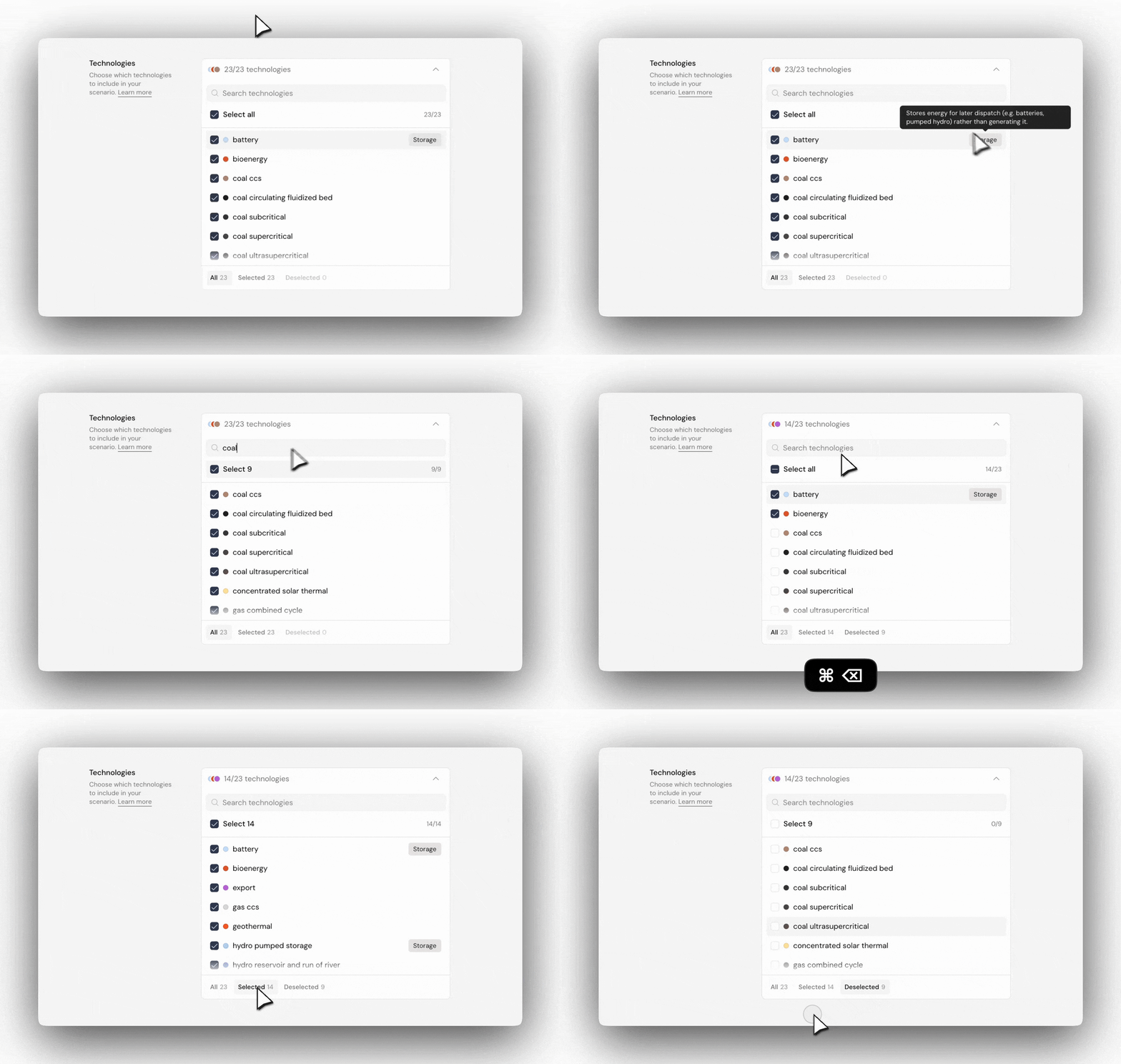
coal drops all nine coal variants, leaving 14 of 23 selected. The All / Included / Excluded tabs let you review the mix before creating.3
Traced across the app
Every technology keeps a consistent colour swatch throughout the app: the creation form, results charts, and the workspace data grid all use the same colour per technology, so you can follow it from configuration to results. In results charts, click a technology in the legend to isolate it, then click again to restore the full mix.
Deselecting a technology removes it from the model entirely, so it won’t appear in inputs, results, or charts. At least one technology must stay selected. Most scenarios keep the full calibrated set and constrain individual technologies through capacity inputs instead.
Deselecting technologies and calibration
A country model is calibrated as a whole: its base-year capacities, generation, emissions, and trade are checked against historical data with the full technology set in place. Take a technology out and that mix changes, so a scenario built on a reduced set no longer meets the calibration standard. Read its results as exploratory rather than validated against history. The scenario still runs, and comparisons between your own scenarios remain valid. What you give up is the guarantee that the base year reproduces history. Scenario Builder flags this in the creation form while any technology is deselected; reselecting the full set restores calibration. To keep calibration and still test a constrained future, leave the technology selected and limit it through capacity inputs instead.Technology directory
The full technology taxonomy is listed below, grouped by family. Parent technologies (e.g. Coal) aggregate their variants; a country model may calibrate at the parent or the variant level depending on data availability. Technologies that store energy rather than generate it are marked Storage.Coal
Coal
Coal-fired power plants, differentiated by steam cycle and combustion type.
Gas
Gas
Gas-fired power plants, from peaking turbines to high-efficiency combined cycles.
Oil
Oil
Liquid-fuelled generation, mostly diesel and fuel-oil engines in island and backup roles.
Nuclear
Nuclear
Nuclear fission reactors across established and advanced designs.
Solar
Solar
Solar generation, photovoltaic and thermal, at utility and domestic scale.
Wind
Wind
Onshore and offshore wind generation.
Hydro
Hydro
Hydropower, from run-of-river to pumped storage.
Geothermal
Geothermal
Generation from underground heat; a firm renewable in volcanic regions.
Bioenergy & waste
Bioenergy & waste
Generation from biological fuels and municipal waste.
Marine
Marine
Generation from ocean energy.
Storage
Storage
Technologies that shift energy through time rather than generate it. All carry the Storage flag.
For pumped hydro storage, see the Hydro family.
Cross-cutting & aggregate
Cross-cutting & aggregate
Labels used where source data reports capacity at an aggregate level, or where a modifier applies across families.
Network & trade
Network & trade
Technologies that move energy between geographies rather than generate it.
The individual links these technologies describe are chosen separately, on their own field in the creation form. See Interconnectors.